
LiviControl 16E
Quick User Guide
Updated June 5, 2026
A quick reference for the most common operations on the LiviControl LC16E. For detailed guides on specific topics, see the other documentation pages.
Navigation Between Pages
- Push and hold Button 16 — the LED above the current page blinks green.
- Push the corresponding button to go to the desired page.
- Release the selected button, then release Button 16.
Save All Settings
- Push and hold Button 5, then push Button 8.
- All LEDs light up in blue — settings are saved.
- Release both buttons.
Learning Mode
- Push and hold Button 1, then push Button 4.
- All LEDs light up in white — you are in learning mode.
- Push the button you want to learn — the selected LED blinks white.
- When the command is successfully learned, the LED stops blinking.
Leave Learning Mode
- Push both Button 2 and Button 3 simultaneously.
- The device returns to normal operation.
Firmware Update Mode
- Push and hold Button 13 and Button 16.
- All LEDs start blinking — after ~5 seconds they stop blinking.
- The device mounts as a USB drive on your computer.
Zoom In to Sequence Mode
- Push and hold the button you want to zoom in to, then push Button 16.
- Release Button 16 before releasing the other button.
To check your current location, hold Button 16 — the current page LED blinks green and the current zoomed-in LED blinks white.
Activate Sequence Mode
- Push and hold Button 13 and Button 14, then push Button 15.
- If the device receives a clock signal, a red LED indicates the current step.
Deactivate Sequence Mode
- Push and hold Button 13 and Button 14, then push Button 15.
- The red LED will no longer be visible.
Recording Sequence Mode
- While in recording mode, push and hold Button 13 and Button 9, then push Button 5.
- The red LED indicating the current step turns white.
- Rotate Knob 16 to record your changes in the pattern.
Pushing down Button 16 while rotating makes the values increase/decrease in bigger steps.
Deactivate All Sequences
- Push Button 9, Button 10, Button 11, and Button 12 at the same time to stop all sequences.
Additional Resources
The full manual and other resources can be found at lividexx.com/lc16esettings. The web editor is available at lc16e.lividexx.com.
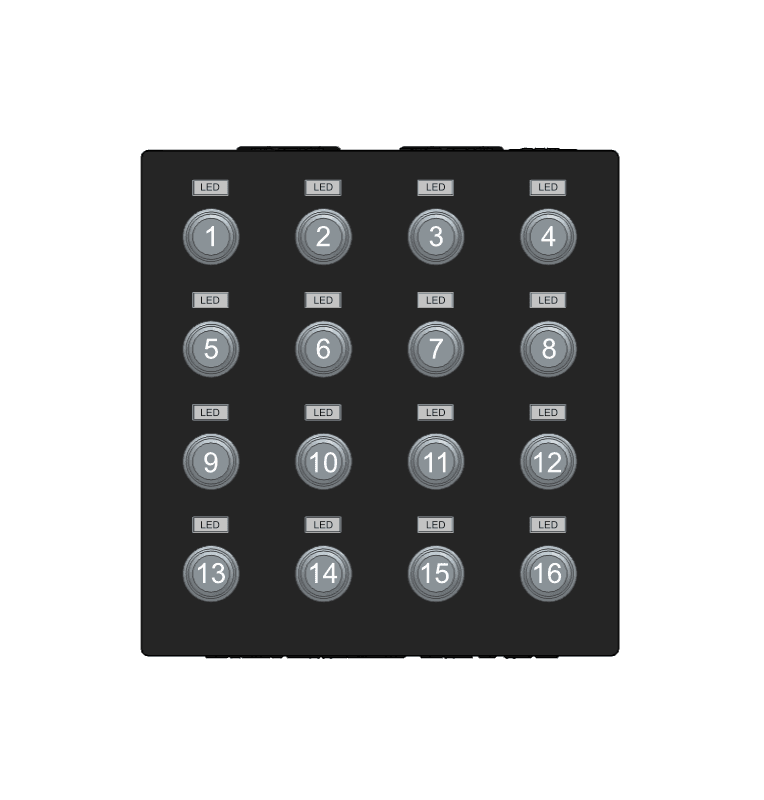
Button layout reference — front panel